


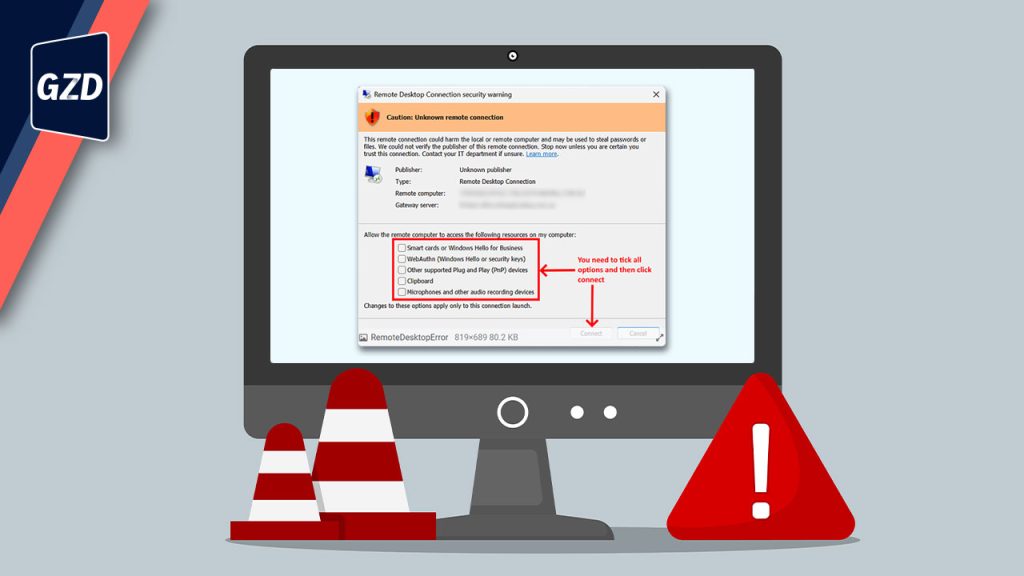
New Remote Desktop Security Warning in Windows: What it is and What to do
If you’re seeing a “Caution: Unknown remote connection” message when connecting via Remote Desktop, don’t panic — this is expected behaviour, not an error.
Microsoft has recently rolled out a security update for Windows 10 and Windows 11 that introduces an additional confirmation step when opening Remote Desktop (RDP) connections. This update is being applied automatically, which means users may start seeing a new pop‑up when connecting to remote systems.
Quick Answer – What Users Need to Do
✅ Tick the required options shown in the pop‑up
✅ Click Connect
✅ In most cases, this is a once‑off prompt for that connection
This warning is part of a Microsoft security enhancement and does not indicate a problem with your computer, network, or Remote Desktop setup.

Why Am I Seeing This Remote Desktop Warning?
Remote Desktop connections often use saved configuration files (called .rdp files) to simplify access to remote systems. However, Microsoft identified that these files have increasingly been abused in phishing and cyber‑attack campaigns. [learn.microsoft.com]
In these attacks, malicious RDP files could be emailed to users and, when opened, silently:
- Redirect connections to attacker‑controlled systems
- Share local files or clipboard data
- Expose credentials or authentication tokens
- Allow access to microphones or connected devices
To reduce this risk, Microsoft now forces users to review and explicitly approve the connection details before proceeding.
This behaviour is by design and is now the standard security model going forward.
What Does “Caution: Unknown Remote Connection” Mean?
This message typically appears when Windows cannot verify the publisher of the RDP connection file.
Important:
“Unknown” does not automatically mean unsafe. It simply means Windows wants the user to:
- Confirm the remote computer they are connecting to
- Review what local resources may be shared
- Make a conscious decision before connecting
This additional visibility helps protect users from accidentally exposing sensitive data.
Is It Safe To Click Connect?
Yes — if you are connecting to a known and trusted system, such as:
- Your office server
- A hosted work environment
- A Remote Desktop connection set up by your IT service provider
Once accepted, Windows generally remembers this choice, and the warning will not appear again for that specific connection, unless something changes.
If you do not recognise the system or were not expecting the connection, stop and contact your IT support provider before proceeding. [learn.microsoft.com]
Why This Matters for Businesses
While this extra step may feel inconvenient at first, it reflects a broader shift by Microsoft toward stronger, built‑in security controls.
This change helps businesses by:
- Reducing credential theft risks
- Preventing silent data sharing
- Making phishing attacks far harder to execute
- Increasing user awareness of remote access risks
It also reinforces the importance of managed IT services, proactive patching, and ongoing user awareness.
How GZD Can Help
At Global Z‑Data (GZD), we actively monitor Microsoft security updates and ensure changes like this:
- Are clearly explained to users
- Do not disrupt business operations
- Align with current cybersecurity best practices
If your team is unsure about new warnings, pop‑ups, or system behaviour, we’re here to help keep your environment secure without sacrificing productivity.
Give us a call ‣ 031 818 9060
Official Microsoft Guidance
Microsoft has published official documentation explaining these new Remote Desktop security warnings here:
Understanding security warnings when opening Remote Desktop (RDP) files [learn.microsoft.com]